Markup & margin – work out price and profit
Price a job without mixing up markup and margin. Enter your cost, and the calculator works out the selling price and profit – and shows the same deal measured both ways.
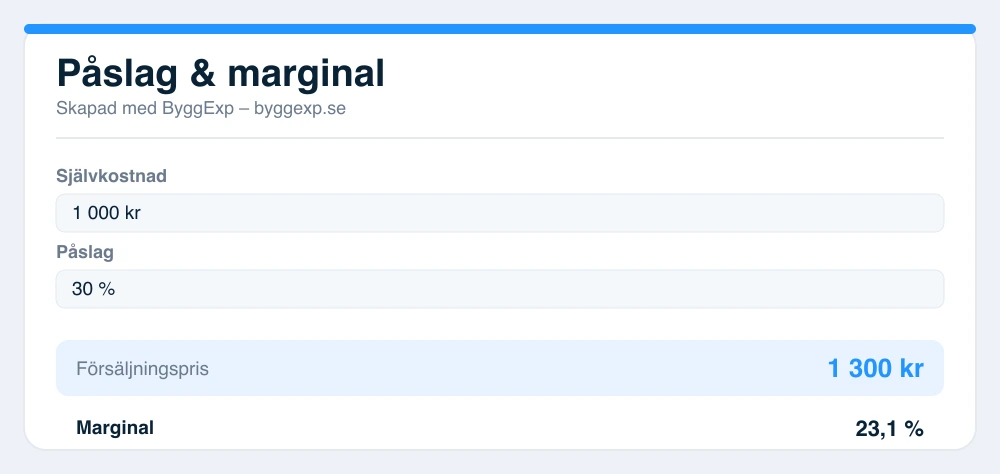
Markup is calculated on the cost price, margin on the selling price – that’s why the percentages differ. A 30% markup gives, for example, a margin of about 23%.
Want help taking this further?
Briefly describe what you need and we’ll help you with a quote, material and next steps – free of charge. Only the contact field is required.
An estimate, not a finished calculation – check against drawings, regulations and supplier data before pricing or ordering.
Markup and margin – what’s the difference?
They are often confused but calculated differently:
- Markup is calculated on the cost: profit ÷ cost.
- Margin is calculated on the selling price: profit ÷ selling price.
That’s why the margin is always a lower percentage than the markup for the same price – a 30% markup equals, for example, a margin of about 23%.
How to set the right price
Always use your real cost price – not just the purchase price, but also handling, waste and risk. Then start from the margin you need for the business to break even, and check that the price is reasonable against the market.
Bädda in kalkylatorn gratis på din sajt
Har du en egen sajt, blogg eller kundportal? Bädda in den här kalkylatorn gratis – kopiera koden nedan och klistra in där du vill ha den. En liten länk tillbaka till ByggExp följer med.
Frequently asked questions about markup and margin
- What is the difference between markup and margin?
- Markup is calculated on the cost, margin on the selling price. To see how much of each invoice actually becomes profit, look at the margin – to quickly add a known percentage onto what you paid, markup is the handier one.
- How do I work out the selling price?
- With markup: cost × (1 + markup). With margin: cost ÷ (1 − margin). The calculator does both and shows profit, markup and margin.
- What markup should I have on material?
- It varies by industry and company, but a markup on material covers handling, waste, storage and risk. Use the calculator to see what a given markup gives in margin.
- Does it cost anything?
- No, the calculator is free and requires no account.